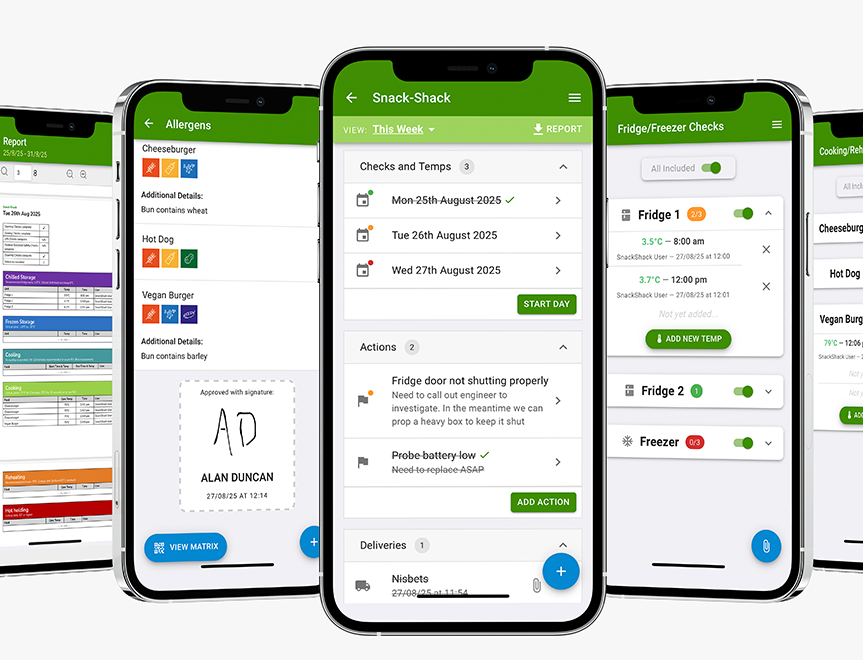
Digital Food Safety System
Save time, reduce hassle and keep your business inspection-ready.

If your bar, café or restaurant website isn’t showing up in Google the way it used to, or never really has, it’s not because you need to understand complicated algorithms.
More often, websites quietly slip down search results because of basic issues that go unnoticed and unchecked. Nothing dramatic breaks, nothing obvious looks wrong, but visibility drops and fewer customers find you online.
The good news? Many of these problems are common, easy to spot, and relatively straightforward to fix once you know what to look for.
Scroll below for 5 of the biggest reasons hospitality websites disappear from Google and what they mean for your business.
Want more simple, proven ideas to help you get found locally, attract more customers, and turn first-time visitors into regulars?
Speed matters more than most owners realise, especially on mobile devices.
If your website takes more than a few seconds to load, many people will leave before they even see your menu or booking button. Google sees this behaviour and assumes your site isn’t providing a good experience, which can push it further down search results.
This is especially important for hospitality businesses because:
Signs your site may be too slow:
Most hospitality searches and bookings now happen on mobile. A site that technically works on mobile isn’t enough – it must be designed around mobile behaviour.
Check with your designer or agency:
What good mobile experience looks like:
Google wants to show users accurate, current information. If your website looks outdated or contradicts what’s shown elsewhere online, Google can lose confidence in it.
This often shows up as:
It’s not just about freshness, it’s about trust. If Google can’t tell whether your information is still valid, it may choose to show another business instead.
This becomes even more important when your website doesn’t match:
Here we explain more about optimising your Google Business Profile.
A customer might click a menu link that goes nowhere, or Google might try to follow a page that no longer exists. Over time, these issues can build up and quietly damage how your site is viewed.
Common examples include:
Beyond broken links, confusing site structure can also hurt visibility. If Google struggles to understand how your pages relate to each other, it’s harder for it to rank them properly.
This is one of the most common and most overlooked issues for hospitality businesses.
Your website should make it immediately clear:
If this information is vague or missing, Google struggles to match your site to local searches.
Examples of unclear signals include:
Google relies on clear, consistent location signals to decide when to show your business to nearby searchers. Find out how to improve your local search visibility with this quick guide.
Your website doesn’t disappear from Google overnight – it fades when small issues are ignored. But the sooner you spot and fix them, the easier it is to win back visibility and help more local customers find your venue when they’re ready to eat, drink or book.
Need more hands-on support with your marketing?
At NCASS, we work with thousands of bars, cafés and restaurants across the UK. From getting found online to expert guidance when you need it, we’re here to help your business thrive. Call us on 0300 124 6866 to chat.



 Featured Training